Transforming Customer Service with AI That “Thinks, Analyzes, and Responds Like a Human”
In 2026, Generative AI (GenAI) will become the heart of the modern Contact Center (Generative AI For Contact Center). It does not merely answer questions — it also helps to understand customer context, summarize information, handle back-office tasks, and support agents in making real-time decisions. Organizations that adopt GenAI early will be able to elevate their Customer Experience (CX) faster and cut operating costs significantly.
This article is a guide (Guideline/Checklist) for organizations that want to start using GenAI systematically, complete with real-world examples you can put into practice right away.
1. Why Is Generative AI For Contact Center So Important?
Because GenAI elevates the Contact Center from a traditional operating model to service that is faster, more accurate, and more customer-friendly through these key capabilities:
- Intelligent messaging/scripting: AI generates natural conversations that are not stiff or robotic.
- Automatic post-call summaries (Auto Summary): Reduces an agent's paperwork by 30–60%.
- Customer context analysis: Understands intent, complaints, and true needs.
- Recommending answers and the next steps (Next Best Action): Reduces errors and improves service quality.
- Creating a Hyper-Personalization experience: Each customer receives the most tailored service possible.
The result is a Contact Center that becomes a Smart Experience Hub — no longer just a service channel.
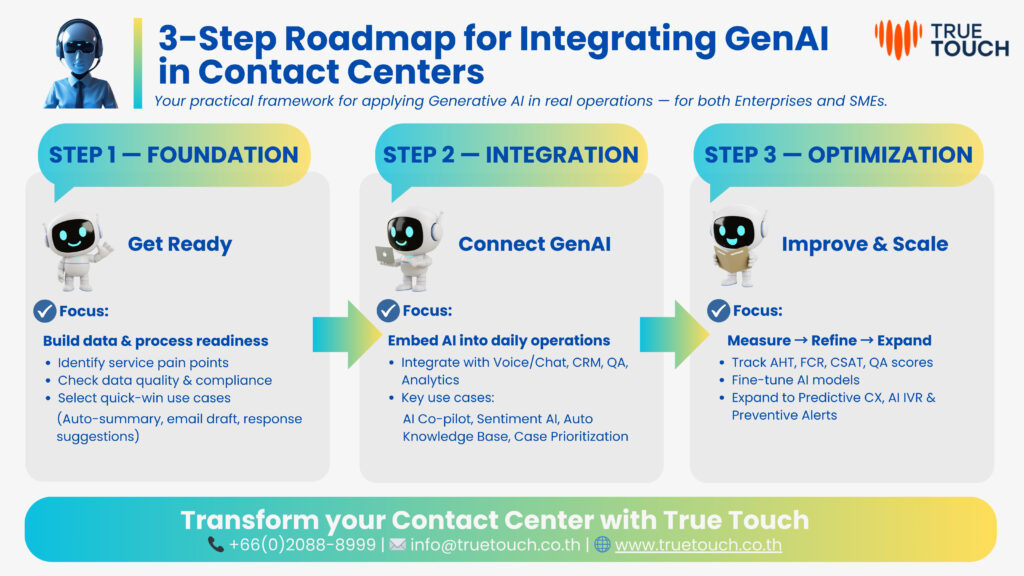
2. A 3-Step Roadmap for Integrating GenAI in the Contact Center
This is a guide that organizations can use as a framework to apply GenAI in practice, suitable for both large enterprises and SMEs.
Step 1: Foundation — Assess Readiness and Data Strategy
Before investing in any system, an organization should start with its “database” and review its “work processes” to be ready. The checklist to complete:
- Analyze the pain points of your current service.
- Verify whether your data is of sufficient quality for the AI to learn from.
- Review relevant policies and PDPA/compliance requirements.
- Select use cases that are easy to do and deliver quick results, such as:
- Auto Email Draft
- Conversation summarization
- Recommending answers for agents
Key Focus: Start small, start fast, and choose tasks that can be improved with immediate results.
Step 2: Integration — Merge GenAI Into the Contact Center System
Once the foundation is ready, the next step is to connect GenAI to the core operating systems of the Contact Center, such as:
- Voice/Chat Platform systems
- CRM & Ticketing systems
- Voice Analytics / Speech Analytics systems
- QA System for quality
Popular use cases for organizations in 2026 include:
- AI Co-pilot for Agents
- AI to help analyze customer emotions (Sentiment)
- AI to automatically build a Knowledge Base from real data
- AI to prioritize cases (Case Prioritization)
Key Focus: Integration that works in practice, seamlessly, without adding to the agent's workload.
Step 3: Optimization — Measure, Improve, and Expand to Other Use Cases
After getting started, the organization must enter the Optimizing stage to continuously make the AI smarter and more accurate. What you should do:
- Measure AHT, FCR, CSAT, CES, and QA Score.
- Tune the model to fit your organization's service context.
- Add an AI-QA quality assurance system.
- Expand use cases, such as Predictive CX, AI IVR, or Preventive Alerts.
Key Focus: Make AI a part of your work culture, not just a temporary project.
Real-World Examples of Generative AI For Contact Center You Can Use Right Away
- AI helps summarize events and information that customers repeat multiple times
- Create templates for complex conversations, such as complaint cases or special-privilege requests
- Analyze recurring problems to reduce repeat calls
- Elevate employee coaching with insights from AI-QA
- Predict customer sentiment trends and alert the supervisor automatically
This is the point where the Contact Center truly begins to become a Smart Command Center.
How Should Small Organizations Start Adopting GenAI in the Contact Center?
The answer: Start with use cases that require “low investment but deliver high results,” such as:
- Use GenAI to help auto-draft responses for messages/emails.
- Use Auto Summary to reduce post-call work time for the Agent.
- Adopt a ChatGPT-style Knowledge Base to replace scattered FAQ files.
- Use a lightweight version of Sentiment Analysis to assess customer emotions.
- If the organization has only a small number of agents → choose a SaaS-based AI Co-pilot that does not require investing in a large system.
SMEs do not need to start with a large system. Simply starting at a small point that genuinely saves time can immediately reduce costs and improve service quality.
Interested in Contact Center, BPO, or intelligent AI / RPA solutions 📩 Free solution consultation
📞 Call: +66(0)2088-8999✉️ Email: [email protected]🌐 Website: www.truetouch.co.th
True Touch – Serve your customers as if our own
💬 FAQ
Q1: Which type of Generative AI For Contact Center is best suited to a Contact Center?
A1: GenAI is suitable for every type of Contact Center — sales, after-sales service, complaint handling, and even back-office work — especially centers that want to improve service quality, reduce AHT, or handle higher work volumes without adding staff.
Q2: How can GenAI help reduce employees' working time?
A2: GenAI reduces manual work such as summarizing conversations, drafting emails, searching for information in systems, and recommending suitable scripts. This reduces employees' post-call time by 30–60% and gives them more time to focus on important cases.
Q3: Will GenAI replace Contact Center employees?
A3: It will not replace them, but rather help employees work faster and smarter. The AI handles routine work while employees focus on tasks that require understanding, empathy, and human-led analysis.
Q4: What kind of data should an organization prepare before starting to use Generative AI?
A4: You should start with:
- Conversation data (Call Transcript/Chat Log)
- Customer data (CRM)
- Service policies
- FAQs and manual documents. The data should be clear, secure, and up to date so the AI can learn accurately.
Q5: GenAI — how does it help improve service quality (QA) levels?
A5: GenAI can analyze 100% of all conversations, detect customer emotions, assess tone of voice, and check script standards. This gives the QA team more accurate insights and lets them focus on coaching employees more precisely than before.
Q6: If you use GenAI, do you have to worry about PDPA or not?
A6: You must consider PDPA very carefully. The system must have data encryption (Encryption), access control (Access Control), and processing based on consent, so that using GenAI is safe and legally compliant.
Q7: Can using GenAI really reduce Contact Center costs?
A7: Yes, it genuinely does over the long term — especially in workforce costs, after-call work time (ACW), human error, and reducing repeat calls. Many organizations see cost reductions of 15–35% within the first year of using GenAI.
Q8: How should a Contact Center SMB or small organization get started?
A8: Start with the simplest use cases, such as:
- Auto Draft for customer response messages
- AI Summary to reduce the agent's workload
- ChatGPT-style Knowledge Base
- SaaS-based Sentiment Analysis
Low investment, quick results, and no need to overhaul the entire system.
Q9: Can GenAI connect to the existing Contact Center system already in use?
A9: Yes. Most GenAI offers APIs that can connect to CCaaS, CRM, Ticketing, and Voice Analytics systems, so it works seamlessly with existing systems without having to start everything over.
Q10: What results can an organization expect after adopting GenAI into use?
A: The three main results are:
- Better efficiency: Lower AHT, lower ACW, and less time spent searching for information.
- Better service quality: Conversations become more accurate and more natural.
- Better CX: Customers get answers faster, more accurately, and more personalized.