
: How to Design AI and Agent Collaboration Without Disrupting CX
AI is playing an increasingly important role in customer service, from answering general inquiries, retrieving information, and summarizing conversations to opening cases and taking certain actions through back-end systems.
While AI can improve speed and reduce repetitive work, not every situation should be left for AI to decide or handle independently. This is especially true for cases involving customer emotions, personal data, financial matters, policy exceptions, or complex issues.
This is why Human-in-the-Loop Customer Service has become an important concept in designing Customer Operations in the AI era. It helps organizations define which tasks AI should handle, when humans should review or take over, and what information should be transferred along with the customer.
The goal is not to maximize the amount of work handled by AI. The real goal is to ensure that customers receive continuous problem resolution without having to start over every time they move from AI to a human agent.
Human-in-the-Loop Customer Service is an operating model in which AI supports analysis, recommendations, or certain operational steps, while humans remain involved in reviewing, approving, correcting, or taking over in situations that require greater judgment and accountability.
This does not mean employees need to review every AI-generated response. Instead, organizations should design the appropriate level of human involvement based on the risk of each task.
NIST states that AI risk management should consider how humans and AI work together, including the limitations of both. Organizations should not assume that simply placing a human in the process will automatically reduce risk if roles and responsibilities have not been clearly designed.
Transferring a customer from a chatbot to a human agent is only one part of Human-in-the-Loop.
Human-in-the-Loop covers human involvement before, during, and after the service interaction, including:
AI creates a response, summarizes information, or proposes an action, and an employee reviews it before it is used.
AI can analyze and prepare a transaction, but human approval is required before execution, such as issuing a refund or changing customer entitlements.
An employee can stop, correct, or take over when AI behaves unexpectedly or is unable to continue.
AI transfers the customer to an employee when a predefined trigger is detected, such as customer dissatisfaction, a high-risk request, or a case that falls outside policy.
Supervisors or system owners monitor quality, accuracy, escalation, errors, and business impact in order to continuously improve the AI system.
Microsoft provides examples of semi-autonomous AI in Customer Service, where AI acts as an assistant and, in certain workflows, may propose sending an email, updating a case, or closing a case only after explicit user approval.
Human-in-the-Loop is therefore not simply a “Talk to an Agent” button. It is an Operating Model that defines how AI, Agents, Supervisors, and enterprise systems work together.
Questions about business hours or order status may follow clear processes. However, complaints involving multiple events, exception requests, or severe dissatisfaction often require deeper interpretation and judgment.
If AI continues trying to solve a problem despite insufficient information, customers may be asked to repeat information, receive recommendations that do not match their situation, or wait longer before reaching a human agent.
Tasks involving financial transactions, personal information, authentication, or changes to customer entitlements should not use the same level of automation as general inquiries.
Human Approval creates an additional control point before an action affects the customer or a live business system.
In some situations, customers need more than an accurate answer. They need to feel heard, understood, and confident that someone is taking responsibility for resolving their issue.
AI can gather information and reduce manual work, while employees focus on empathy, negotiation, and rebuilding customer trust.
As AI becomes capable of recommending or executing more actions, organizations must clearly define who owns the process, who has approval authority, and who is accountable when something goes wrong.
The NIST AI Risk Management Framework recommends managing AI risk through ongoing governance, contextual understanding, measurement, and risk management rather than evaluating risk only before a system goes live.
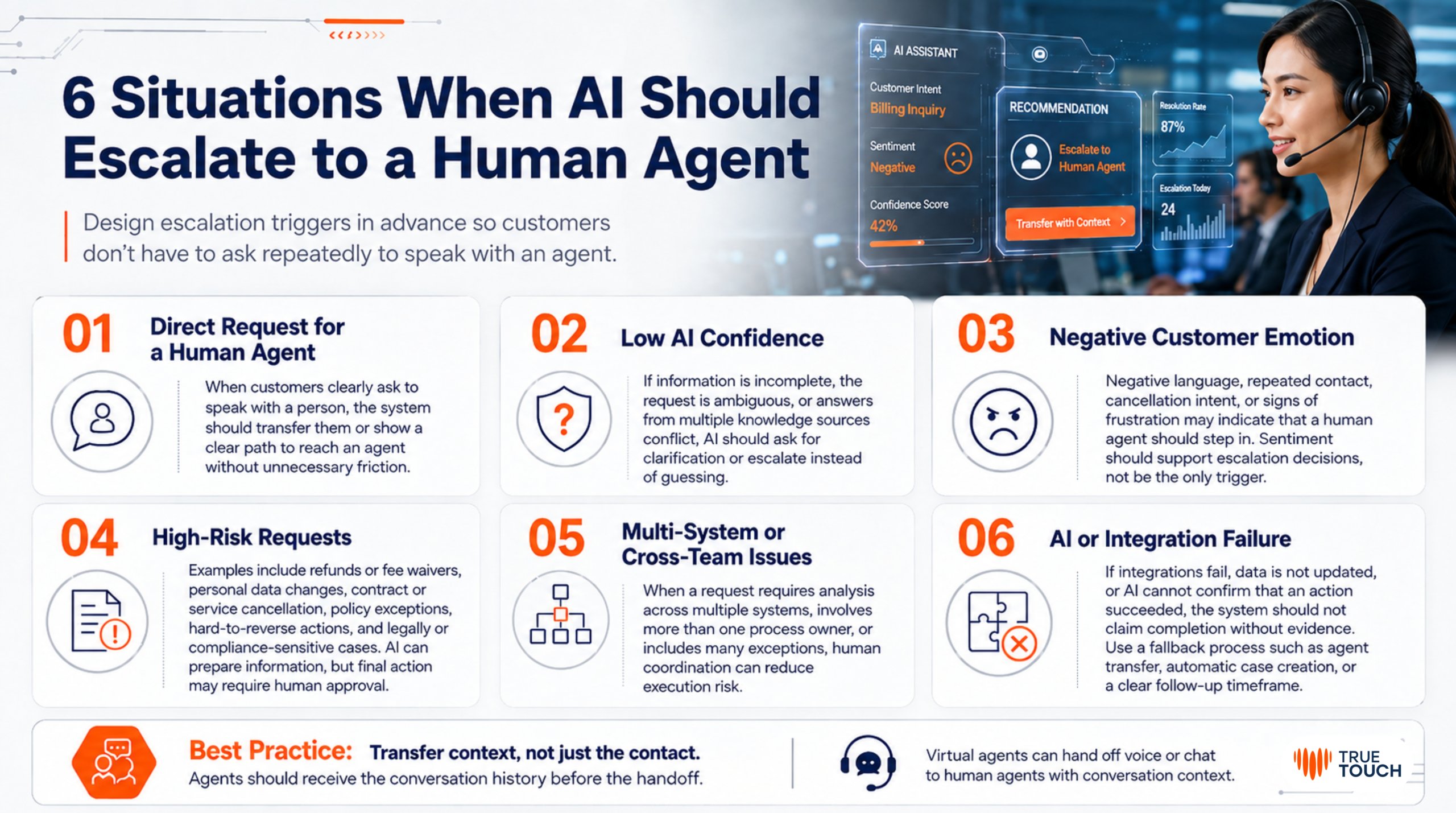
Organizations should design Escalation Triggers in advance rather than waiting until customers repeatedly type or say, “I want to speak to an agent.”
When a customer clearly asks to speak with a person, the system should transfer them or provide a clear path to reach an agent without creating unnecessary friction.
If information is incomplete, the request is ambiguous, or answers from multiple Knowledge sources conflict, AI should ask for more information or escalate to an employee rather than guessing.
Negative language, repeated contact, cancellation requests, or expressions of frustration may indicate that a human agent should step in.
Sentiment analysis should be used as a supporting signal rather than the sole reason for escalation, as language and context vary from one customer to another.
Examples include:
- Refunds or fee waivers
- Changes to personal information
- Contract or service cancellation
- Policy exceptions
- Actions that are difficult to reverse
- Cases with potential legal or compliance implications
AI can collect and prepare the necessary information, but the final action may require Human Approval.
If a request requires analysis across multiple systems, involves more than one process owner, or includes many exceptions, human coordination may reduce the risk of executing the wrong process.
If an integration fails, data is not updated, or AI cannot confirm that an action has been completed successfully, the system should not tell the customer that the request has been completed without evidence.
A Fallback Process should be available, such as transferring the customer to an agent, automatically creating a case, or providing a clear follow-up timeframe.
Google Cloud supports Virtual Agent designs that allow Voice or Chat interactions to be transferred to a human agent together with the conversation history that occurred before the handoff.
One of the most common customer pain points occurs when the customer has already provided information to AI, but after being transferred to an employee, they are asked to explain the entire issue again.
This creates the impression that the organization’s channels are disconnected and turns AI into an additional source of Customer Effort rather than reducing it.
Microsoft notes that AI Agents in Contact Centers can capture conversation context and transfer it to employees together with the conversation history, helping the receiving Agent understand the situation more quickly.
The key principle is:
Transfer the context, not just the contact.
A good handoff is not simply about transferring a call or chat. It should allow the employee to continue from exactly where AI stopped.
Organizations do not need to assign the same level of human involvement to every Use Case. Instead, the level of involvement can be determined based on risk.
| Level | Role of AI | Role of Human | Example |
|---|---|---|---|
| Level 1: Inform | Retrieve and present information | Review when necessary | FAQ, Order Status |
| Level 2: Recommend | Analyze and recommend responses | Employee decides whether to use the recommendation | Agent Assist |
| Level 3: Draft | Prepare content or an action | Employee reviews before sending or executing | Email Reply, Case Summary |
| Level 4: Execute with Approval | Prepare and execute after approval | Review and approve | Refund, Fee Waiver |
| Level 5: Autonomous within Guardrails | Execute within predefined boundaries | Monitor and manage exceptions | Appointment, Routine Update |
The appropriate level should be determined by factors such as:
The same Use Case may use different levels of automation depending on the situation.
For example, AI may be allowed to issue a small refund within predefined conditions but require approval if the amount exceeds a certain Threshold or suspicious activity is detected.
Based on more than 20 years of True Touch experience in Contact Center management and Customer Experience Solutions, successful AI implementation does not depend on technology accuracy alone.
Organizations must design People, Process, Technology, and Data to work together and support one another.
Four areas deserve particular attention.
If AI handles more interactions but customers contact the organization again, escalation takes too long, or employees have to recreate information from scratch, the overall outcome may not actually improve.
Sending a long transcript without a summary or a clearly identified Intent may increase the employee’s workload.
Handoff information should therefore be designed to be concise, clear, and verifiable.
Agents and Supervisors should be able to correct recommendations, cancel actions, or provide feedback to the system when an error is identified.
The reasons employees correct AI responses, reject recommendations, or take over interactions should be captured and analyzed.
This data can reveal:
Knowledge Gaps
Process Gaps
Use Cases that AI is not yet ready to handle
True Touch applies the Human AI Contact Center concept by combining the speed and data-processing capabilities of AI with human empathy and judgment, allowing technology to enhance service quality rather than completely replace the Human Touch.
Define what AI will do, what information it will use, and what the impact could be on customers and the business if something goes wrong.
Specify conditions that require escalation, such as:
Not every case should be routed to the same Queue.
Routing should consider:
Define what information the Agent should immediately receive so they do not need to search across multiple systems or ask the customer to repeat information.
Employees need to understand:
Metrics that should be monitored include:
These metrics help organizations determine whether AI-to-Human Handoff genuinely creates a seamless resolution experience or simply moves the workload from one system to another.
Before going live, organizations should be able to answer the following questions:
If these answers are not yet clear, organizations should strengthen their Process and Governance before increasing the level of AI autonomy.
Human-in-the-Loop Customer Service does not mean that humans must review everything AI does.
It means designing the roles of AI and humans according to the type of work, context, and risk level.
AI should handle tasks that benefit from speed, data processing, and consistency, while humans should step in when empathy, judgment, approval, or accountability is required.
The key is to design AI so that it knows:
When to continue.
When to stop.
And when to hand over to a human.
When an AI-to-Human Handoff transfers the right information, context, and responsibility, organizations can improve efficiency without sacrificing continuity of Customer Experience or the Human Touch.
True Touch is ready to help organizations analyze Customer Journeys and design Human-in-the-Loop, Escalation Frameworks, and AI-to-Human Handoff models that align with business processes, technology, and organizational objectives.
With more than 20 years of experience in Contact Center and Customer Experience Solutions, we help combine AI, Automation, and Human Expertise to deliver faster customer service while ensuring human support remains available at the moments that matter most.

Tel: +66(0)2088-8999
Email: [email protected]
Website: https://www.truetouch.co.th/en
It refers to an operating model in which AI helps answer questions, analyze information, provide recommendations, or perform certain steps, while humans can still review, approve, correct, or take over in complex or high-risk situations.
AI should escalate when the customer requests a human agent, AI lacks sufficient confidence, the customer shows strong dissatisfaction, the request falls outside Policy, the case involves financial or data-related risk, or the system cannot confirm that an action has been completed successfully.
Organizations should transfer the conversation history, Intent, verified information, actions already completed by AI, reason for escalation, and recommended Next Best Action together with the Interaction. This allows the Agent to take over immediately without asking the customer to explain everything again.