

: 8 KPIs to Measure AI in Contact Centers and Connect CX with Business Impact

Many organizations are beginning to use AI in customer service, from Chatbots, Voicebots, Agent Assist, and AI Quality Assurance to Agentic AI that can automatically perform certain operational tasks.
Once these solutions go live, one question often follows:
“What percentage of the workload can AI handle?”
This number is useful, but it is not enough to determine whether AI is actually solving customer problems or generating meaningful business value.
AI may handle a large number of interactions, but if customers still need to contact the organization again, are transferred to the wrong team, or employees need to redo information from scratch, the result may simply be a shift of workload from one channel to another.
Google Cloud recommends measuring AI using metrics linked to business objectives. In customer service, these may include Containment Rate, Average Handling Time, Customer Satisfaction, and employee productivity.
Microsoft also distinguishes key metrics for AI Agents, such as Resolution Rate, Escalation Rate, Abandon Rate, and CSAT, helping organizations understand the outcome of different types of conversations.
AI Customer Service Metrics are a set of indicators used to evaluate how effectively AI answers questions, resolves customer issues, supports employees, and creates measurable outcomes for Customer Operations.
Good measurement should not focus only on volume, such as the number of interactions handled by AI. It should also answer important questions such as:
NIST recommends that organizations establish both quantitative and qualitative measures for AI performance and trustworthiness and continuously monitor system behavior after deployment.
AI KPIs should therefore not exist only within Technology team dashboards. They should also connect with Customer Service, Operations, CX, and Business KPIs.
Automation Rate shows how much work is handled automatically, but it does not indicate whether the work was completed successfully or whether the customer received a good experience.
For example, AI may handle 10,000 interactions and escalate only 20% to employees, which may initially appear to be a strong result.
However, if:
the organization may have a high Automation Rate without creating real Customer Value.
A more effective measurement approach should therefore evaluate AI Activity, Customer Outcome, and Business Impact together.
| Measurement Level | Key Question | Relevant KPIs |
|---|---|---|
| Operational Performance | How efficiently is AI operating? | Resolution Rate, Containment Rate, Escalation Rate, Resolution Time |
| Customer Experience | Are customers receiving successful resolutions and a good experience? | Repeat Contact Rate, CSAT, CES |
| Business Impact | Is AI creating value and increasing operational capability? | Cost per Resolution, Agent Productivity |
Organizations should not evaluate only one of these levels because each KPI group helps validate the others.
For example, an increase in Containment Rate should occur without a decline in Resolution Rate or CSAT.
If Containment increases while Repeat Contact also rises, the system may be preventing customers from reaching employees rather than successfully solving their problems.
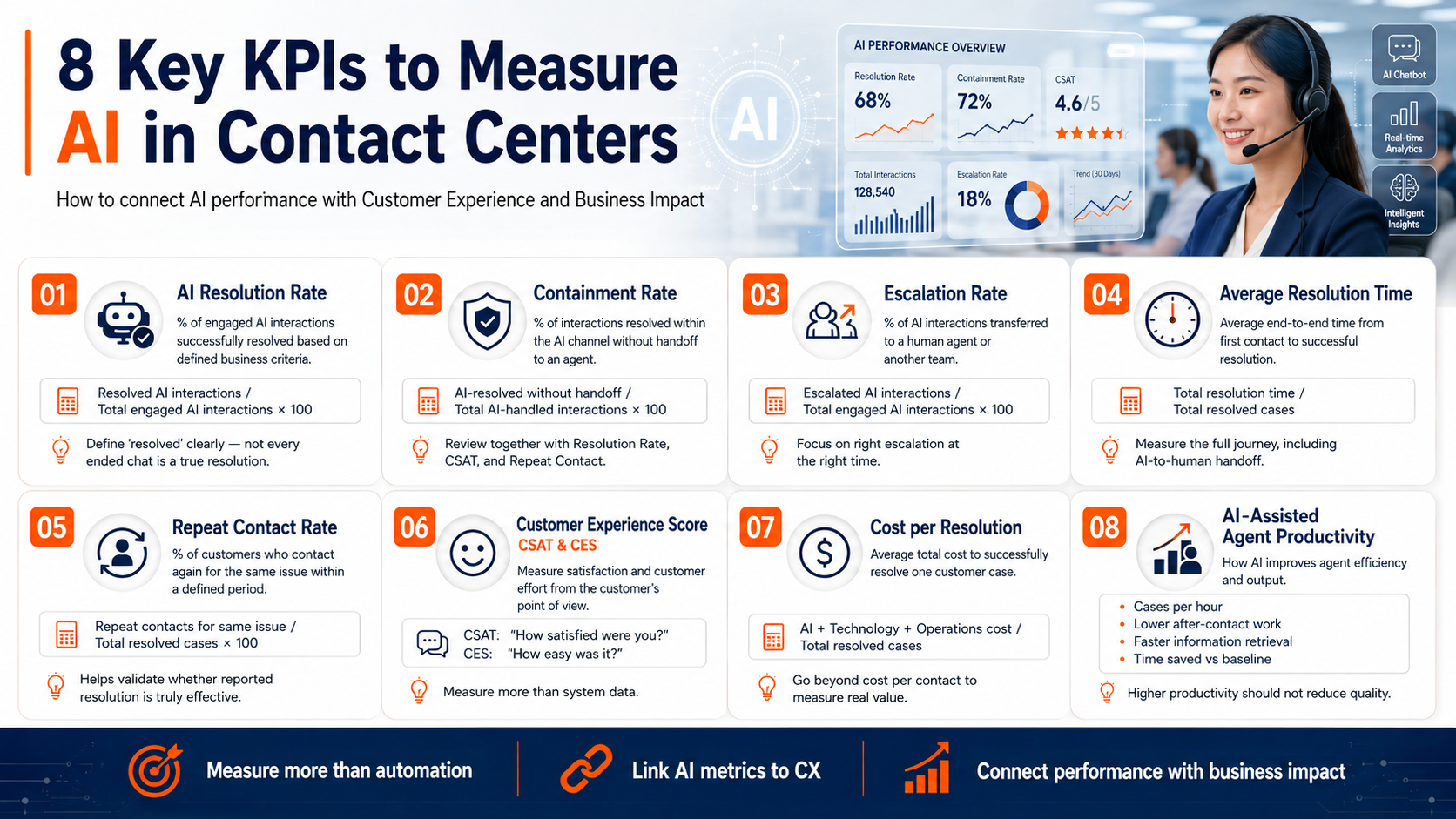
AI Resolution Rate is the percentage of interactions in which AI successfully resolves the customer's issue based on the criteria defined by the organization.
Example Formula
Successful AI-resolved interactions
÷ Total Engaged AI Interactions × 100
Microsoft defines Resolution Rate as the percentage of Engaged Sessions that end with a Resolved outcome, which may be confirmed by the user or determined by system logic.
However, organizations should clearly define what “Resolved” means.
For example:
A Chat ending or a customer leaving the system should not automatically be considered a successful resolution.
Containment Rate is the percentage of interactions that AI can handle and resolve within the AI channel without transferring the customer to an employee.
Example Formula
Interactions successfully handled by AI without escalation
÷ Total AI-handled interactions × 100
Google Cloud describes Call and Chat Containment Rate as a measure of the interactions that AI can receive and resolve, helping organizations understand how effectively Automation can handle demand and support service scalability.
Containment Rate should always be considered together with Resolution Rate.
Not escalating an interaction does not necessarily mean that the customer's problem was resolved.
If Containment increases while CSAT falls or Repeat Contact rises, organizations should investigate whether AI is genuinely creating resolution or merely creating a barrier between customers and employees.
Escalation Rate is the percentage of interactions that AI transfers to a human employee or another team for further handling.
Example Formula
Escalated AI Interactions
÷ Total Engaged AI Interactions × 100
Google Cloud and Microsoft use Escalation Rate to indicate the proportion of AI conversations transferred to a Human Agent.
A high Escalation Rate does not necessarily mean AI is underperforming.
If AI correctly identifies high-risk cases, complex issues, or negative customer sentiment and transfers them appropriately, the system may be working exactly as designed.
Organizations should also analyze:
The goal is therefore not necessarily to minimize Escalation Rate.
The goal should be:
Right Escalation at the Right Time.
Average Resolution Time is the average time from the moment a customer initiates contact until the issue is successfully resolved, whether the case is completed by AI or handed over to an employee.
Example Formula
Total time from initial contact to successful resolution
÷ Total successfully resolved cases
This KPI provides a more End-to-End view of the customer journey than Average Handling Time, which typically measures only the period when an Agent is actively handling the customer.
For cases involving AI-to-Human Handoff, organizations should also measure:
Microsoft notes that AI Agent dashboards can track Resolution Time and Escalation Time alongside Resolution Rate and Escalation Rate to evaluate process performance.
Repeat Contact Rate is the percentage of customers who contact the organization again about the same issue within a defined period, such as 24 hours, three days, or seven days.
Example Formula
Cases with repeat contact for the same issue
÷ Total cases classified as resolved × 100
This KPI helps verify whether the resolution reported by the system represents a real customer resolution.
If AI Resolution Rate is high but Repeat Contact Rate also increases, possible causes may include:
Repeat Contact Rate therefore helps connect AI performance with the customer's actual experience.
Organizations should measure AI from the customer's perspective rather than relying only on system data.
CSAT evaluates customer satisfaction after an interaction.
For example:
“How satisfied were you with this service experience?”
Microsoft includes CSAT as one of the core metrics for evaluating Conversational Agents, usually based on post-interaction surveys.
CES measures how much effort the customer had to make in order to get their issue resolved.
For example:
“How easy was it to complete this process?”
CES is particularly useful for AI Customer Service because a system may respond quickly while the customer still needs to navigate multiple menus, enter the same information repeatedly, or make several attempts before getting the right answer.
Organizations may use either CSAT or CES depending on the Customer Journey, or use both for important Use Cases.
Cost per Resolution is the average cost an organization incurs to successfully resolve one customer case.
Example Formula
Total AI, Technology, and Operations costs
÷ Total successfully resolved cases
Cost calculations should include more than the AI Platform fee.
Relevant costs may include:
Using Cost per Contact alone may make AI appear cost-effective even when some interactions are not successfully resolved.
Cost per Resolution provides a clearer connection between operating cost and the actual outcome delivered to the customer.
AI creates value not only through direct customer interactions.
It can also improve employee Productivity through capabilities such as:
Organizations can measure impact through:
Microsoft recommends establishing Baselines and linking AI Agent metrics to business Value Drivers such as Productivity, Cost Efficiency, Revenue, or Service Quality rather than evaluating value based only on Usage.
Productivity improvements should also occur without compromising Quality.
Therefore, productivity should be monitored alongside QA Score, Error Rate, and Customer Satisfaction.
| KPI | Baseline | Target | Actual | What to Analyze |
|---|---|---|---|---|
| AI Resolution Rate | 35% | 50% | 47% | Which Intents can AI still not resolve? |
| Containment Rate | 45% | 60% | 62% | Do contained customers contact again? |
| Escalation Rate | 55% | 40% | 38% | Is escalation going to the right Skill at the right time? |
| Average Resolution Time | 12 min | 8 min | 9 min | Is the delay occurring in AI or the Human Queue? |
| Repeat Contact Rate | 18% | 12% | 15% | What is causing repeat contacts? |
| CSAT | 82% | 88% | 86% | Compare AI-only and Handoff interactions |
| Cost per Resolution | Current Baseline | Reduce 15% | Reduce 11% | Which cost components remain high? |
| Agent Productivity | 8 cases/hour | 10 cases/hour | 9.5 cases/hour | Which work steps has AI already reduced? |
The figures above are examples intended to illustrate the measurement approach.
Each organization should establish its own Baseline and Target based on the nature of the work, service channels, complexity, and quality of available data.
Business, Operations, IT, and Vendor teams should use the same definitions for:
Microsoft notes that different Analytics systems may count Sessions and Conversations differently, which can cause Resolution Rate and Escalation Rate to vary even when they are based on the same Customer Journey.
Organizations should capture performance data before introducing AI.
Without a Baseline, teams may only see post-Go-Live numbers without being able to determine what has actually improved or changed.
Organizations should avoid combining every Intent into one average.
AI may perform well in status-checking tasks but may not yet be suitable for Complaints or complex Transactions.
Results should be segmented at least by:
In addition to Operations and CX KPIs, organizations should monitor:
NIST recommends continuously monitoring AI performance, behavior, risk, and impact after deployment because system performance may change as data, context, and operating conditions change.
A Target during the Pilot stage does not necessarily need to be the same as the Target after Scale.
As AI begins supporting more complex Use Cases, Escalation Rate may temporarily increase or Resolution Rate may decline even though the overall system is creating more value.
Teams should therefore review Dashboards regularly—for example, weekly during a Pilot and monthly after Stabilization—and analyze Root Causes rather than focusing only on whether KPI indicators are red or green.
Based on more than 20 years of True Touch experience in Contact Center management and Customer Experience Solutions, technology performance should always be connected to Operational and Customer Outcomes.
AI should not be measured as an isolated Technology project.
True Touch focuses on KPIs that reflect outcomes such as Cost per Contact, First Contact Resolution, Customer Trust, and measurable CX, supported by a framework connecting People, Process, Technology, and Data.
A common challenge is that organizations may have dashboards containing large amounts of data but still be unable to answer questions such as:
True Touch therefore evaluates AI Contact Center performance through measurable outcomes such as Cost per Contact, Escalation Rate, Customer Satisfaction, and Agent Productivity while maintaining the right balance between AI and Human Expertise.
Before reporting performance, organizations should be able to answer the following questions:
Good AI Customer Service Metrics should not simply measure how much work AI can handle.
They should demonstrate whether AI is successfully resolving customer problems, improving employee performance, and creating measurable business outcomes.
The key is to connect all three levels of measurement:
AI Performance shows how well the system performs.
Customer Experience shows what outcomes and experiences customers receive.
Business Impact shows whether AI investment creates real value for the organization.
With clear Baselines, KPI Definitions, and Dashboards, organizations can make more informed decisions about which AI Use Cases should be Scaled, which should be improved, and where Human Expertise is still required.
rue Touch is ready to help organizations assess Customer Journeys, establish Baselines, design AI Customer Service Metrics, and develop Performance Dashboards that connect Operational Efficiency, Customer Experience, and Business Impact.
With more than 20 years of experience in Contact Center and Customer Experience Solutions, we help organizations implement AI and Automation based on Process, Data, and measurable KPIs that can be continuously monitored and improved.

Tel: +66(0)2088-8999
E-mail: [email protected]
website: https://www.truetouch.co.th/th
No single KPI can represent the full performance of AI Customer Service.
Organizations should evaluate Resolution Rate, Containment Rate, and Escalation Rate together with Repeat Contact, CSAT, and Cost per Resolution to understand operational performance, Customer Experience, and business value.
Containment Rate measures how many interactions remain within the AI channel without being transferred to an employee.
Resolution Rate measures whether the customer’s problem was actually resolved.
A high Containment Rate therefore does not necessarily mean that the organization also has a high Resolution Rate.
Targets should be based on the organization’s current Baseline, Use Case characteristics, customer complexity, data quality, and system readiness.
Organizations should not apply the same Benchmark universally.
A better approach is to begin with a Pilot, measure actual performance, and adjust Targets once sufficient data is available.